

The Problem You’re Facing
❌ Need multiple Facebook accounts but don’t want to use personal emails
❌ Running test campaigns that require disposable profiles
❌ Privacy concerns linking business accounts to permanent emails
❌ Managing short-term projects that don’t need long-term accounts
❌ Email verification issues slowing down account deployment
Your Solution: Temp Mail Profiles
✅ Brand new Facebook accounts with temporary email access
✅ 2FA enabled for security despite temp mail
✅ Advertising-ready from day one
✅ No personal email exposure
✅ Instant deployment capability
⚡ What You Get (Quick Overview)
Account Package:
- New Facebook profile (created 2025)
- Temporary email access (fully functional)
- Two-factor authentication + recovery codes
- Session cookies for secure login
- 0-30 real friend connections
- Live advertising status (pre-warmed)
Delivery Format: UID | Password | 2FA Key | Temp Mail Access
Delivery Time: Instant digital access after purchase
🎯 Perfect For
Test Campaign Managers → Run multiple ad tests without burning permanent emails
Agency Teams → Deploy client accounts quickly without email verification delays
Privacy-Conscious Marketers → Keep personal/business emails separate from test accounts
Short-Term Projects → Launch and abandon accounts without email trail concerns
💼 Key Specifications
Account Details
- Type: Brand new profile (no history)
- Email: Temporary mail with full access
- Friends: 0-30 real connections pre-added
- Status: Pre-warmed and advertising-ready
- Security: 2FA enabled despite temp mail
- Usage: Immediate deployment, no restrictions
Access & Security
- Complete login credentials
- Temp mail inbox access
- 2FA recovery codes included
- Session cookies provided
- All account control transferred to you
Compatibility
- Works globally (any country)
- No proxy required for login
- Proxy recommended for multi-account operations
- Compatible with Business Manager
- All advertising features enabled
🚀 Quick Setup (30 Minutes)
Step 1: Access & Verify (5 min)
- Log in with provided credentials
- Verify temp mail access works
- Check 2FA functionality
- Confirm friend network loaded
Step 2: Secure Account (10 min)
- Change Facebook password
- Change temp mail password (if supported)
- Save 2FA backup codes
- Review security settings
Step 3: Deploy (15 min)
- Customize profile (photos, bio)
- Create business page if needed
- Connect to Business Manager
- Set up ad account
- Launch campaigns
Done. Account operational in under 30 minutes.
⚖️ Temp Mail vs Regular Email Profiles
Why Choose Temp Mail?
Privacy Protection Your personal or business email stays completely separate. No link between your permanent identity and these test/project accounts.
Rapid Deployment No verification waiting. No inbox management. Deploy and use immediately without email overhead.
Disposable Nature Need to replace account? No permanent email connections to worry about. Clean separation for short-term projects.
Multi-Account Scaling Managing 10, 20, 50 accounts? Temp mail eliminates email verification bottlenecks that slow down scaling.
Temp Mail Limitations (Be Aware)
⚠️ Account Recovery: Harder to recover if you lose credentials (temp mail expires)
⚠️ Long-Term Use: Not ideal for permanent brand accounts needing years of continuity
⚠️ Email Changes: Can’t easily switch to permanent email later
⚠️ Some Features: Advanced verification may require permanent email
Best Use: Short-term campaigns, testing, privacy-focused operations, high-volume account operations.
🛡️ Warranty Coverage
Protected Issues (6 Hours)
- Checkpoint 282 on initial login
- Phone/device verification before password change
- Login credentials incorrect
Protected Issues (24 Hours)
- Temp mail access not working
- Account specs don’t match description
- Advertising features disabled
- 2FA codes non-functional
Not Covered
✗ Problems after using “Forgot Password”
✗ Login failures from blocked IPs
✗ Issues after changing credentials
✗ Temp mail expiration (natural behavior)
Critical: Check access immediately after purchase. Change passwords within first hour.
🔧 Best Practices
For Single Account Users
- Log in with clean residential IP
- Secure all credentials immediately
- Save temp mail access details safely
- Customize profile before business use
- Test advertising features within 24 hours
For Multi-Account Operations
- Use separate browser profiles per account
- Dedicate unique IP (proxy) to each account
- Maintain organized credential storage
- Stagger activity across accounts
- Monitor account health regularly
What to Avoid
❌ Sharing temp mail credentials publicly
❌ Expecting temp mail to function like permanent email
❌ Using for long-term brand building
❌ Relying on temp mail for critical recovery
❌ Logging multiple accounts from same IP
❓ Quick FAQ
Why temp mail instead of regular email?


Privacy, disposability, and rapid scaling. No permanent email connections, no verification bottlenecks, perfect for test campaigns and short-term projects. Is temp mail less secure? For these use cases, no. Accounts still have 2FA enabled. The difference is email doesn't persist long-term. Save credentials carefully since recovery is limited.


Can I change to permanent email later?


Technically possible but complicated. If you think you'll need permanent email, consider regular email profiles instead. Temp mail is for disposable/test use.


Will this work for advertising?


Yes. Pre-warmed and advertising-ready. Connect to Business Manager and launch campaigns immediately.


How long does temp mail last?


Varies by service. Typically accessible for days/weeks. Save all credentials immediately—don't rely on temp mail long-term.


Can I use from any country?


Yes. Works globally. Use proxies matching target markets for best results with advertising.
Delivery: Instant to your dashboard after payment
📞 Support
Telegram: @proadsassets (Fast response)
Email: hello@proadsassets.com (Detailed help)
Lifetime technical support included beyond warranty period.
Accounts Format:
Uid | Password | 2fa Key| Temp Mail Access
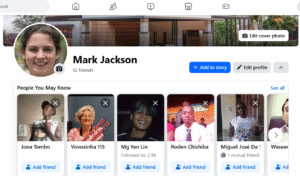
| These profiles can be used from any country, and no proxy is required for login. However, using proxies is recommended if you manage multiple accounts. |
If you have any questions or requests regarding the product, feel free to contact us at any time. We are ready to assist you.



What truly stands out is the resilience of these profiles; they don’t immediately trigger red flags, which is a testament to a well-optimized temporary mail solution.
This new temp mail for Facebook profiles is pure genius. It’s instantly made my workflow more efficient and professional – a true game-changer for anyone managing multiple accounts!