Verified Facebook Business Manager: What Changes and Why It Matters
Updated: June 2026 | 5 min read
Most advertisers create a Business Manager and start spending without ever going through Facebook’s business verification. It works — until they hit the spending ceiling and realize the path forward is blocked. Verification removes that ceiling. This guide explains what it actually changes, what the process requires, and what to do if you need verified status without going through the documentation process yourself.
In This Article:
What Business Manager Verification Actually Means
Facebook’s business verification process confirms that a Business Manager belongs to a real, operating company. It’s not a technical setting — it’s a review process where Facebook checks your business against official documents and confirms the entity behind the BM is legitimate.
To complete verification, Facebook requires: a legal business name matching official documents, a verified phone number and business address, a business domain you own and control, and supporting documents such as registration certificates, utility bills, or tax records.
Once verified, the BM receives a status in Meta’s system that changes how the algorithm and Facebook’s review teams treat every ad account and asset connected to it.
Verified vs Unverified BM: The Real Differences
The differences between verified and unverified Business Managers show up in four specific areas that directly affect campaign results.
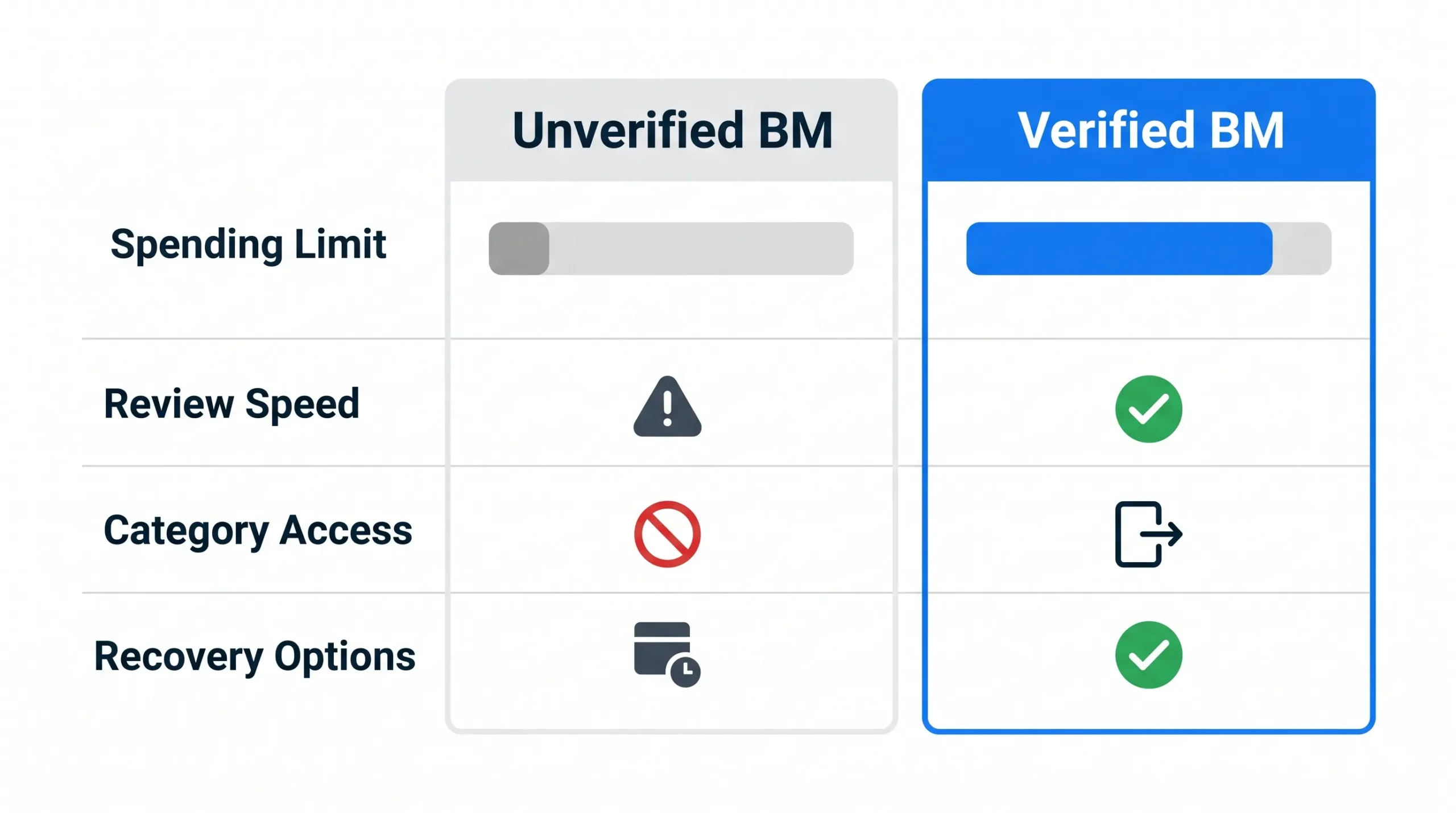
Spending limits. Unverified BMs typically start at $50/day or less. Verified BMs start at $200–500/day. The difference isn’t just convenience — it’s the ability to run real budgets from day one without waiting months for limit increases.
Ad review frequency. Unverified BMs face more frequent random holds, especially in sensitive categories. Verified BMs absorb review triggers with less disruption because the business identity is already confirmed.
Access to restricted categories. Finance, health, and lead generation categories require additional verification in many regions. Unverified BMs have limited or no access. Verified BMs open these categories up.
Recovery options after restriction. If a verified BM gets restricted, there are more established pathways for recovery because Facebook can verify the business identity on file. Unverified BMs have fewer options when something goes wrong.
Who Needs a Verified Business Manager
Media buyers scaling beyond $200/day. Unverified BMs hit walls at spending levels where verified BMs continue scaling cleanly. If your daily budget target is over $200/day, verification is the faster path to getting there.
Agencies managing client campaigns. Client budgets don’t wait for spending limits to grow over three months. A verified BM handles real client budgets from day one without the slow warmup that new unverified accounts need.
Advertisers in sensitive categories. Finance, health, and high-ticket lead generation face heavier category scrutiny. Verified BMs absorb that scrutiny more cleanly than unverified accounts trying to operate in the same space.
Anyone who has been through a BM ban. Starting fresh with a verified BM after a ban is significantly more stable than rebuilding from an unverified account.
How the Verification Process Works
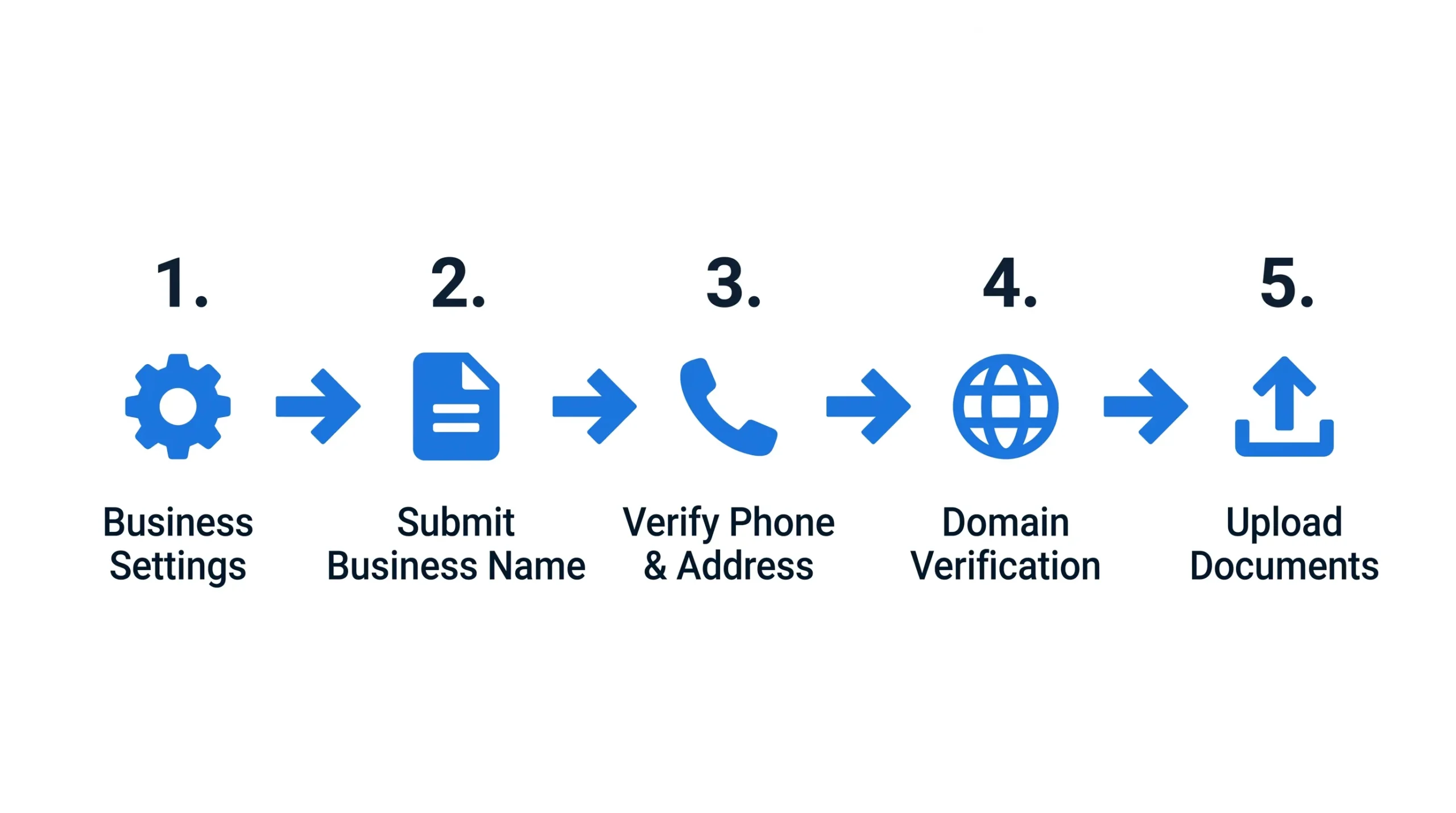
Facebook’s verification process runs through Meta Business Settings and typically takes 5–14 business days.
Step 1: Go to Meta Business Settings → Security Center → Business Verification. Click “Start Verification.”
Step 2: Enter your business legal name exactly as it appears on official documents. Any mismatch causes rejection.
Step 3: Verify your business phone number and address. Facebook will call or text to confirm.
Step 4: Verify your business domain through Meta’s domain verification process.
Step 5: Upload supporting documents — business registration, utility bill, or tax document with matching business name and address.
The most common rejection reasons are document name mismatches and domain ownership issues. Facebook allows resubmission after fixing the specific flagged issue.
How to Keep a Verified BM Clean
Verification improves your baseline. It doesn’t make the BM immune to restrictions. These rules protect verified status over time.
Warm up spending even on a verified BM. Start at $50–100/day even though your limits are higher. Aggressive spending on day one raises signals regardless of verification status. Give the algorithm two weeks to learn your spending pattern first.
Keep payment methods consistent. Use a business card tied to the same entity that verified the BM. Don’t swap cards frequently — payment instability triggers automated reviews.
Add assets gradually. Adding 10 ad accounts and 15 pages to a freshly connected BM in one week triggers reviews. Add one or two assets at a time over several days.
Keep the verified domain live. The domain used for verification should remain active and connected to real business content. Meta cross-checks this periodically.
Your Next Step
A verified Business Manager removes the most common ceiling advertisers hit when scaling. If your current BM is blocking your growth, verification is the direct fix.
- Verified Business Managers — already confirmed, ready to connect
- Reinstated Ad Accounts — pair with your verified BM for maximum stability
- Facebook Business Manager Complete Guide →
Questions about verification status or setup? Contact Proads Assets.
Frequently Asked Questions
How do I verify my Facebook Business Manager?
Go to Meta Business Settings → Security Center → Business Verification. Submit your legal business name, phone, address, domain, and supporting documents. The review takes 5–14 business days.
What are the benefits of a verified Business Manager?
Higher starting spending limits, faster ad reviews, access to restricted advertising categories, and stronger recovery options if your BM gets restricted. All four directly affect campaign performance.
How long does Facebook Business Manager verification take?
Typically 5–14 business days. Complex cases or document issues can extend this to 30 days. Rejected applications can be resubmitted after fixing the flagged issue.
Can I use a verified BM that someone else set up?
Yes, if ownership is properly transferred through Facebook’s Business Manager system. Verified status transfers with the BM when ownership changes correctly.
Is a verified BM worth it for small budgets?
If your daily budget target is under $100/day, an unverified BM works fine to start. If you plan to scale beyond $200/day within the first few months, starting with a verified BM saves weeks of limit-building time.
About the author: The Proads Assets team specializes in verified Facebook advertising infrastructure for media buyers and agencies. Browse verified Business Managers here.